Feb 18, 2026

Selling a tenant-occupied or heavily cluttered home is a special kind of uphill battle. Buyers scroll fast, first impressions form even faster, and piles of boxes or overflowing countertops can make rooms feel smaller, darker, and harder to love. Here’s the deal: you don’t always have the time (or access) to physically empty a property before photos. That’s where a smart, compliance-aware approach to digital decluttering can save a listing.
In this guide, you’ll get a practical, three-step workflow to plan the shoot, clean up images with AI-driven tools, and publish with clear disclosures—so you can improve appeal without crossing MLS/ethics lines.
A quick decision guide: physical vs. digital declutter
If you can reasonably remove bulky items that affect how the space functions (blocked doorways, trip hazards), prioritize physical cleanup for safety and showings. If access is limited (tenant schedules, storage constraints) or timelines are tight, lean on digital cleanup for photos while you plan staged showings later. And if surfaces or fixtures are damaged, do not hide defects digitally; disclose condition and align edits with your local MLS rules.
The 3-step agent workflow for AI real estate declutter
Think of this as your repeatable blueprint. We’ll keep it tight, tactical, and compliant.
Step 1 — Plan and capture originals
Start with consent and compliance. If the home is tenant-occupied, confirm photo permissions and discuss what will show in images. Align edits to what your MLS allows and what must be disclosed. As a contemporary example, California’s AB 723 led to explicit labeling expectations across several MLSs—CRMLS, for instance, details when to label images “digitally altered” or “virtually staged” and instructs agents to upload the unaltered original near the altered version; see the current guidance in the CRMLS Digitally Altered Image Guidance & FAQs (updated 2026) and treat it as a model to check your own rules. For a policy explainer, the CCAR overview of AB 723 requirements (2026) breaks down what counts as an “alteration” vs. exempt global adjustments. A practitioner perspective from DeLeon Realty’s 2026 legal update notes a local practice of uploading both altered and unaltered images—another signal to verify your MLS.
Prioritize rooms that sell—living areas, kitchen, primary bed/bath—and capture a complete “originals” set to keep on file and, where required, to publish alongside altered versions. For technical shooting basics, keep verticals straight, avoid strong color casts, and bracket exposures if needed. Clean capture makes later object removal faster and more realistic.
Step 2 — AI declutter and quality check
Work on copies, not your originals. Use AI object/furniture erasers or room-declutter tools to remove lightweight clutter: extra chairs that crowd a shot, countertop appliances, boxes, toys, piles of mail. Start with modest selections and expand as needed. Then inspect carefully for artifacts—repeating textures, warped baseboards, mismatched shadows, and mirror/reflection oddities.
Maintain architectural truth. Don’t remove damage, change finishes, or alter room dimensions. Many MLSs treat those as disclosure-required at minimum and, in some cases, prohibited without explicit labeling. After AI cleanup, fix tricky spots with manual tools: clone/heal small edges; add a soft shadow where objects previously sat so the space doesn’t look unnaturally flat.
Prep for export early. For MLS display, a practical starting point is JPEG in sRGB and a long edge around 1500–2048 px with moderate quality (75–85%). This aligns with practical web-display guidance such as Rashad Penn Photography’s MLS image sizing recommendations (2025); always confirm your MLS specs.
Step 3 — Disclose, export, and publish
Label what’s altered and retain an audit trail. Many markets now expect explicit labels (e.g., “digitally altered” or “virtually staged”) and, in some cases, the unaltered original uploaded adjacent to the altered version. The CRMLS Digitally Altered Image Guidance & FAQs and the CCAR AB 723 explainer underscore the importance of transparency; always verify your local MLS rules before you publish.
For file hygiene, keep a clean folder with originals, altered versions, and a simple disclosure note. Consistent image naming helps (e.g., 01_LivingRoom_ORIG, 02_LivingRoom_ALTERED). Export for MLS at JPEG, sRGB, 1500–2048 px on the long edge, quality ~80% as a reliable baseline; confirm platform limits to avoid unwanted compression.
Practical example: a neutral, repeatable AI workflow
Here’s a simple micro-walkthrough to show where AI fits. Suppose you’ve shot a small living room with toys on the rug and stacked mail on a console.
Duplicate the original file and open it in your chosen tool.
Use an AI object-removal brush to select the toys and mail. Tidy small areas first; review, then expand selections.
Inspect seams at the floor, baseboards, and console edge. If needed, add a soft shadow with a low-opacity brush to restore depth.
Tools vary; many platforms now support this pattern. One example is Collov AI, which offers room-level decluttering and furniture/object removal. If you use it, start with the Room Declutter feature for broad cleanup, then refine specific objects with a targeted eraser. Keep your original on file and apply your MLS’s labeling rules before you publish.
Troubleshooting and pro tips
Mirrors, glass, and TVs: Remove the object plus its reflection; if the fill looks “too perfect,” lightly paint noise or add a faint gradient to match the scene.
Floor–wall seams and baseboards: If the AI creates repeating patterns, re-run a smaller selection and blend with a clone/heal pass; reintroduce a soft shadow if the area looks unnaturally flat.
Perspective first, cleanup second: Correct verticals and geometry before decluttering; refills blend better on aligned images.
Tools and services to remove items from real estate photos
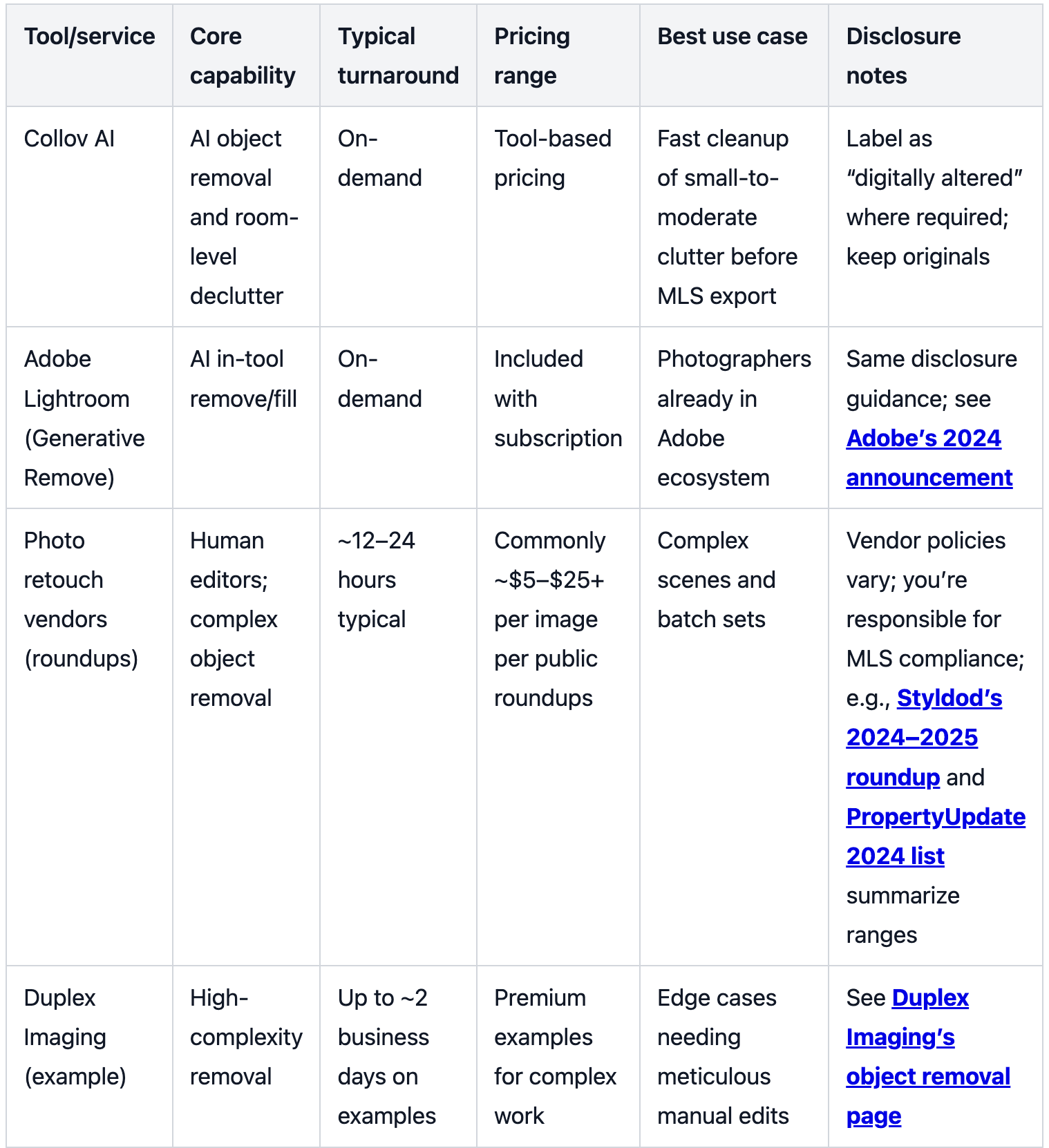
Below is a compact, non-exhaustive snapshot of options. Match the method to complexity and your timeline. This is also where “virtual decluttering software” fits alongside human editors.
Compliance mini-checkpoint for a selling cluttered house
Across 2025–2026 examples, acceptable global enhancements often include exposure/white balance, cropping/straightening, HDR merges, and perspective fixes. Minor removal of non-structural clutter is typically allowed provided it doesn’t misrepresent condition. By contrast, adding/removing fixtures, changing finishes/materials, altering views or landscaping, or hiding defects generally requires clear labeling and, in some MLSs, pairing the altered image with the original. California’s AB 723 prompted explicit labeling norms in several markets; see the CCAR explainer for definitions and the CRMLS Digitally Altered Image FAQs for label language and pairing steps. A practitioner note from DeLeon Realty’s 2026 legal update highlights a local practice of requiring both altered and unaltered images—use that as a signal to double-check your rules before publishing.
Time and cost realities (plus why photos still matter)
When timelines are tight, outsourcing heavy object removal to human editors may not be feasible. Public vendor roundups in 2024–2025 commonly list object removal services around $5–$25+ per image with turnarounds in the 12–24 hour window, subject to complexity and volume; see summaries like Styldod’s comparison (2024–2025) and PropertyUpdate’s 2024 list. For a premium, high-complexity example, Duplex Imaging’s object removal page shows a two-business-day context.
Physical organizing is also valuable—but it’s slower to schedule and coordinate, especially with tenants. National home-services guides suggest professional organizers often charge hourly and projects can span several hours to a full day depending on scope and region; see HomeAdvisor’s 2025 organizer cost guide and an Angi overview on hiring organizers (2024) for representative ranges and factors.
Why do these images matter so much? Because staging—even virtual or partial—affects buyer perception. In 2025, the National Association of Realtors reported that nearly half of sellers’ agents said staging reduced time on market and many observed a modest value uplift; see the NAR newsroom summary (2025-05-06) for those highlights. The takeaway is simple: clarify what’s real, label what’s altered, and present each room at its best within the rules.
Next steps
If you’re ready to test an AI-first approach, start with one room, keep your originals, and label altered images per your MLS. For a hands-on option that fits into the workflow above, you can explore Collov AI’s Virtual Staging hub and evaluate how decluttering and staging tools fit your team’s process. Then export in sRGB, keep a tidy audit folder, and go live. Let’s dig in and make that messy listing shine—transparently.