Feb 25, 2026

Large office plates are sitting longer than anyone would like because prospects can’t picture how a blank box becomes a productive workplace. The good news: the leasing tide is turning, but you still need an edge. Industry trackers reported stabilization and improving activity into late 2025—CBRE noted Q4 2025 leasing of 60.2M square feet and positive net absorption, with rent growth ticking up year over year, while JLL highlighted a post‑pandemic high in Q4 leasing and sharply contracting construction pipelines setting up 2026 scarcity for newer product. See the evidence in CBRE’s Q4 2025 U.S. Office Figures and JLL’s U.S. Office Market Dynamics for 2025—both point to incremental recovery, not a flood. In short: buyers are back, but they’re choosy.
Here’s the deal: when you turn empty floor plates into clear, credible layout options, you compress time‑to‑lease. This guide shows listing brokers how to use commercial virtual staging—purpose‑built visuals that speak to headcount, adjacencies, and workflow—to move prospects from scroll to tour to proposal faster.
Commercial vs Residential: What Visuals Must Do for Brokers
Residential photography sells a feeling. Commercial visuals have a different job: they must prove functional fit. Corporate tenants and their advisors are looking for test‑fit credibility (can this suite handle 90 heads at today’s density?), adjacency logic (where do collaboration zones sit relative to focus rooms and the core?), and wayfinding (how light and circulation actually live across the plate). National trackers like CBRE and JLL keep underscoring a bifurcated office market; the winners pair quality product with clear workplace narratives that support faster, lower‑risk decisions.
That’s why commercial virtual staging isn’t lifestyle fluff. It’s the visual counterpart to a test‑fit—expressed through photoreal images that map to likely programs. Done well, it reduces back‑and‑forth on plans and gets tenant decision teams to common ground sooner.
How Commercial Virtual Staging Works in CRE Workflows
There are three common paths to visualizing office interiors for marketing and early decision support. Each has trade‑offs on speed, cost, and revision agility.
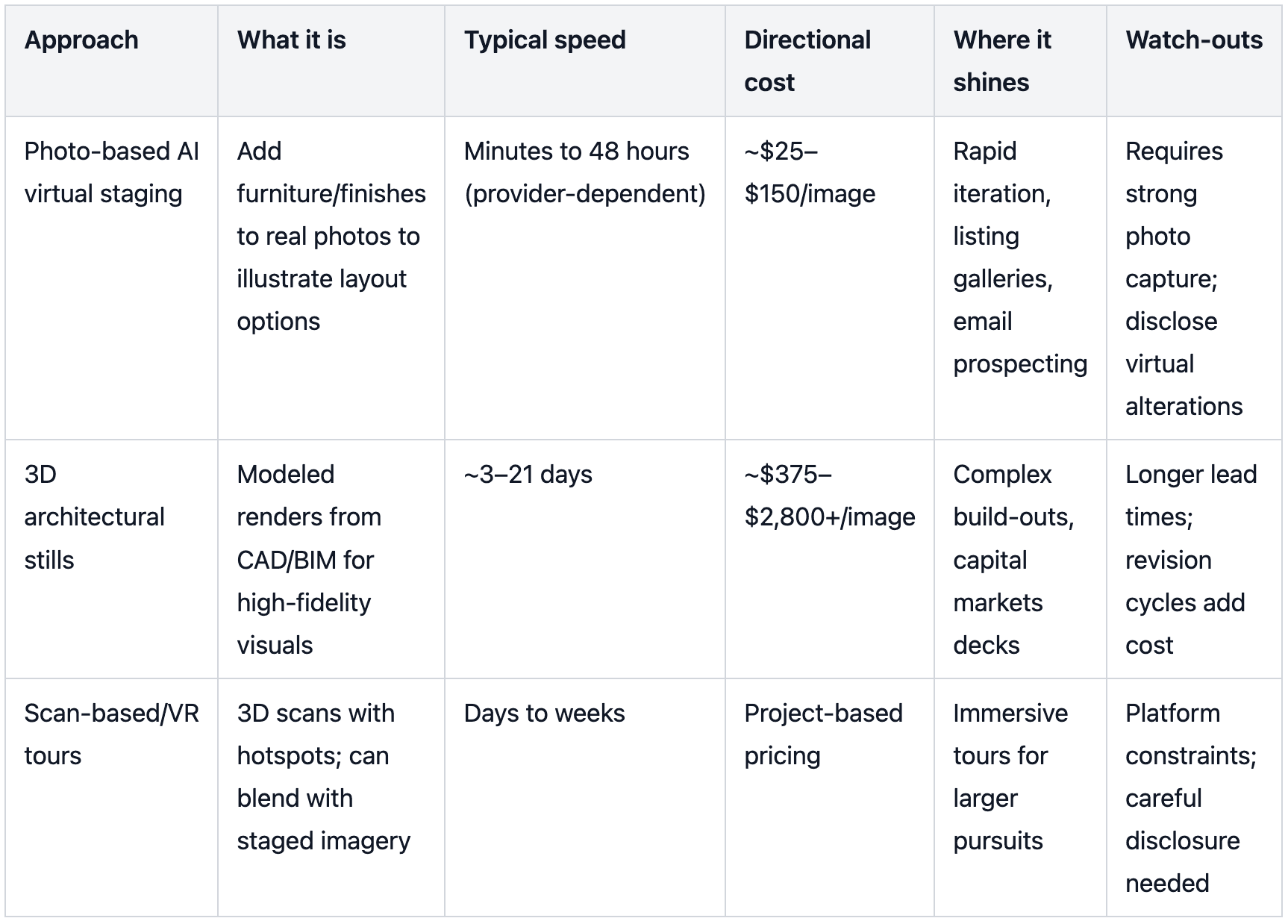
Two notes on claims and compliance: First, hard, office‑only, large‑sample data proving leasing speedups from virtual staging is scarce; treat provider‑reported gains as illustrative, not universal. Second, any altered image must be labeled near the image—FTC truth‑in‑advertising rules expect clear, conspicuous disclosure.
Photo Capture & Prep for Large Floor Plates
Great commercial virtual staging starts with credible raw photos. Capture the plate like a workplace strategist, not as a generic interior.
Use a full‑frame 16–35mm lens without fisheye distortion, tripod‑mounted at roughly 4.5–5.5 feet. Bracket exposures (HDR) to manage bright perimeter light and deep cores. Shoot high‑resolution landscape frames.
From each zone, take at least two angles: core‑to‑perimeter to show daylight penetration and returns from the perimeter looking back to the core. Favor corner angles that reveal three walls, columns, and ceiling grids for scale.
Prep the space—declutter, remove temporary signage, and time the shoot for even daylight. If you’ll show finish upgrades later (carpet, lighting), capture clean baselines that won’t fight the overlay.
When you rigidly control vantage points now, your staged sets will feel consistent later—and prospects won’t second‑guess what’s real.
Zoning the Empty Plate: From Headcount to Test‑Fit to Images
Start with the program. Rough‑in headcount and work styles by team, then sketch adjacencies: focus neighborhoods, collaboration spines, enclosed meeting rooms, reception and client areas, café or lounge hubs, and support spaces. Translate that into density ranges the audience understands. Historically common planning heuristics land around 150–250 rentable square feet (RSF) per seat for traditional programs, 100–175 RSF/seat for modern hybrid benching, and 50–100 RSF/seat for high‑density teams like call centers. Treat these as guidelines to validate against local code, building constraints, and the tenant’s actual work model.
Now pick three to four vistas per suite that will tell the whole story: the entry view toward reception or a collaboration zone; a core‑to‑perimeter shot showing daylight and depth; a return shot from perimeter to core; and, if available, a view across the main amenity or café area. Those images become your canvas for commercial virtual staging.
Multi‑Angle Consistency: Why It Makes Commercial Virtual Staging Credible
Prospects and tenant‑rep brokers will flip between images to stress‑test your story. If the conference table jumps location between angles or lighting direction flips without cause, trust erodes. Cross‑view coherence means furniture, finishes, lighting behavior, and circulation paths align exactly across every vantage of the same zone. It also means scale holds: desk depths, seat widths, and aisle widths relate believably to mullion spacing, columns, and ceiling grids. Research communities working on multi‑view generation and 3D‑aware perception have formalized this idea—consistency across views preserves spatial truth. For your purposes, bake that standard into your QA: compare angles side by side, verify the same SKUs and placements, confirm path continuity to exits, and check that staged items don’t conceal building features or potential defects. When consistency is visible, the staged narrative reads as a real, navigable workplace—exactly what decision teams need.
Presenting Multiple Layout Options to Lease Faster
Most committees want choice without chaos. Package two contrasting options—say, Traditional (banks of workstations with select perimeter offices) and Modern Hybrid (benching with focus rooms and lounge‑forward collaboration). Keep finishes consistent between variants so viewers focus on planning differences, not mood swings. Present three matched angles for each option and pair each staged shot with its baseline empty photo. Add concise captions that echo the program: “Modern Hybrid: 90 seats at ~165 RSF/seat; collaboration spine along south perimeter; two 10‑person rooms adjacent to reception.” Place a small, proximate label such as “Virtually staged to illustrate potential layout” on or directly beneath each altered image to meet disclosure expectations.
You can also reassure design committees by previewing finish upgrades. A carpet‑or‑ceiling replacement can be illustrated via a light‑touch overlay; if you use an AI tool with a dedicated finish layer, apply it surgically and maintain the same overlay across all relevant views.
Practical Micro‑Example: Multi‑Angle, Multi‑Layout in Minutes
Imagine a 17,500 RSF open‑plan suite with a 30‑by‑30 foot column grid and a south‑facing glass line.
Step 1: Capture three angles—entry to core, core‑to‑perimeter, and a perimeter‑to‑core return—at consistent heights and exposure.
Step 2: Produce two variants on the same photos: Traditional (cubicles plus a glass‑walled boardroom) and Modern Hybrid (open desks, focus rooms, café lounge). Keep finishes identical between variants so only the planning shifts.
Step 3: Generate matched, cross‑view‑consistent images for each variant. A tool like Collov AI can be used to maintain the same furniture SKUs and placements across angles, so when a prospect toggles between the entry shot and the perimeter return, the conference room, lounge seating, and workstation banks align exactly.
Step 4: If the prospect asks for a quick tweak—e.g., benching instead of cubicles in the Traditional set—use an AI “add furniture” workflow to iterate rapidly while preserving the core composition. For light finish previews, a dedicated material overlay can help visualize carpet or ceiling changes without rebuilding the entire set.
Disclosure: Display each staged image alongside its baseline photo with the caption “Image digitally altered for visualization. Furniture and finishes shown are conceptual.” This preempts credibility questions on tour.
For rapid optioning across roles and departments, keep your file naming and slide organization tight: “Suite 1200 – Option A – Angle 1 (Entry) – Staged + Baseline.” When teams meet, the narrative flows.
Internal note for practitioners: If you’re building the option set yourself, AI virtual staging workflows that let you add, remove, or swap furniture directly in photos can accelerate revisions. When you need a finish change without restaging, a material overlay workflow is useful. For deeper edits and polishing, a tutorials hub with editing guidance can save cycles.
Distribution: Where and How to Use the Assets
Put the commercial virtual staging where it speeds decisions.
Offering Memoranda and tour decks: Lead with one hero angle per option, then show matched secondary views. Pair each staged shot with the empty baseline on the same spread and repeat your disclosure caption.
Marketplaces: In listing galleries, sequence images as Baseline → Staged so prospects understand what’s real before they see the concept. Many brokers include short captions like “Some photos virtually staged”—add an on‑image or direct‑proximity label to be safer under truth‑in‑advertising principles. Also note that marketplace terms may restrict altering platform‑provided media; do not modify any marketplace‑owned photos or watermarked assets.
Brokerage websites and email: Use small, lightweight hero images that render crisply on mobile. Include a one‑line synopsis per option and a link to a slide deck with the full multi‑angle set. Keep alt text accurate for accessibility and compliance.
Costs, Timelines, and ROI Signals
Decision teams will ask, “What’s the payback?” Directionally, physical staging for offices is uncommon and often cost‑prohibitive, running into the thousands with days or weeks of logistics. 3D architectural stills range widely—from the high hundreds to low thousands per image with multi‑week timelines—perfect for capital markets packages, heavy TI storytelling, or flagship pursuits. Photo‑based commercial virtual staging typically costs a fraction per image and can turn around within a day or two, which is ideal for listing velocity and early‑stage optioning.
ROI is clearest when you track funnel shifts: inquiry lift on marketplace listings after you add staged options, tour‑set rates from email sends that include multi‑angle sets, and proposal rates when multiple layouts are presented up front. While some providers share case vignettes (e.g., empty offices leasing faster after staged images are published), rigorous office‑only datasets aren’t public. Treat any numbers you cite as directional and attribute the source in your deck or OM.
FAQs for Leasing Teams
What makes commercial virtual staging different from residential for office listings?
Commercial staging focuses on functional validation—headcount mapping, adjacencies, and credible circulation—so tenant‑rep brokers can pressure‑test fit. Residential emphasizes lifestyle mood and finishes. The office audience wants test‑fit‑level clarity in the images.
How many angles should we stage per option?
Three is a proven sweet spot for most suites: entry vista, core‑to‑perimeter, and a perimeter return. Add a café/amenity angle for larger plates. What matters most is that each angle aligns precisely with the others.
Do we need to show both baseline and staged images?
Yes. Publishing the empty photo next to its staged counterpart builds trust with committees and addresses disclosure best practices. Keep concise captions like “Virtually staged to illustrate potential layout.”
What about densities—how specific should we be?
Use ranges with disclaimers (e.g., ~165 RSF/seat) and remind prospects that final counts depend on code, load factors, and the tenant’s work model. Back up any claims with a simple test‑fit in the OM.
Where do we add disclosures so we’re compliant?
Place a clear label on or directly beneath each altered image. Truth‑in‑advertising guidance emphasizes proximity and clarity, not buried footnotes.
Next Steps
If you want to trial a multi‑angle, multi‑layout workflow on an active listing, request a short demo and bring three baseline angles of a single suite. We’ll walk through producing two contrasting options, keeping cross‑view consistency tight, and packaging the set for OMs, galleries, and email. Ready to show tenants exactly how an empty plate can work for them? Let’s dig in.
References and further reading (selected): According to the 2025 year‑end summaries in CBRE’s Q4 2025 U.S. Office Figures and JLL’s U.S. Office Market Dynamics (Q4 2025), leasing volumes rose and net absorption turned positive by late 2025, while construction pipelines contracted. For disclosure standards, see the FTC’s Advertising FAQs for Small Business. For marketplace media rights constraints, review CoStar’s Media Rights Terms and Conditions. For density framing and measurement language, use BOMA’s terminology as your baseline in the BOMA Office Measurement Standards overview.
Internal resources to streamline your workflow: Explore AI virtual staging workflows for adding or swapping furniture in photos via AI add furniture, preview finish changes with a material overlay, and consult hands‑on editing and tutorials when you need to refine outputs.
SEO note for readers: This guide uses the terms commercial virtual staging, virtual staging for office space, lease vacant commercial property, and B2B virtual staging to reflect how brokers and tenants search for these solutions today.