Jan 14, 2026

AI virtual staging uses artificial intelligence to place photorealistic furniture, decor, and lighting into real listing photos so buyers can visualize how empty or outdated rooms might look when furnished. Unlike physical staging—which brings real furniture on‑site—and traditional manual virtual staging—where designers add items by hand—AI generates realistic interiors in minutes, scales across dozens of photos, and supports agent workflows with compliance labeling, audit trails, and consistent styles across angles.
Virtual staging for real estate agents: definition and context
Think of AI virtual staging as a digital stylist for your listing photos: you upload a vacant room, choose a design style, and the system arranges furniture that matches the room’s geometry, perspective, and light. It differs from:
Physical staging: trucks, movers, and rental contracts to install real furniture in the property.
Manual virtual staging: human editors use Photoshop/3D to place items one image at a time, typically with longer turnarounds.
Industry coverage notes AI’s speed and scalability compared with older methods. For example, recent overviews describe how AI has compressed timelines while improving photorealism and workflow integration for marketers and agents; see the agent‑focused perspective in Inman’s explainer on AI virtual staging (2025) and Virtuance’s discussion of AI’s impact on virtual staging (2024–2025).
Virtual staging vs physical staging — the essentials
For most mid‑market residential listings, the core tradeoffs are cost, speed, logistics, and buyer expectations. Physical staging can deliver in‑person emotional impact at showings, but it’s slower and more expensive. AI virtual staging is faster and more scalable, ideal for online marketing and for presenting possibilities—especially for vacant homes.
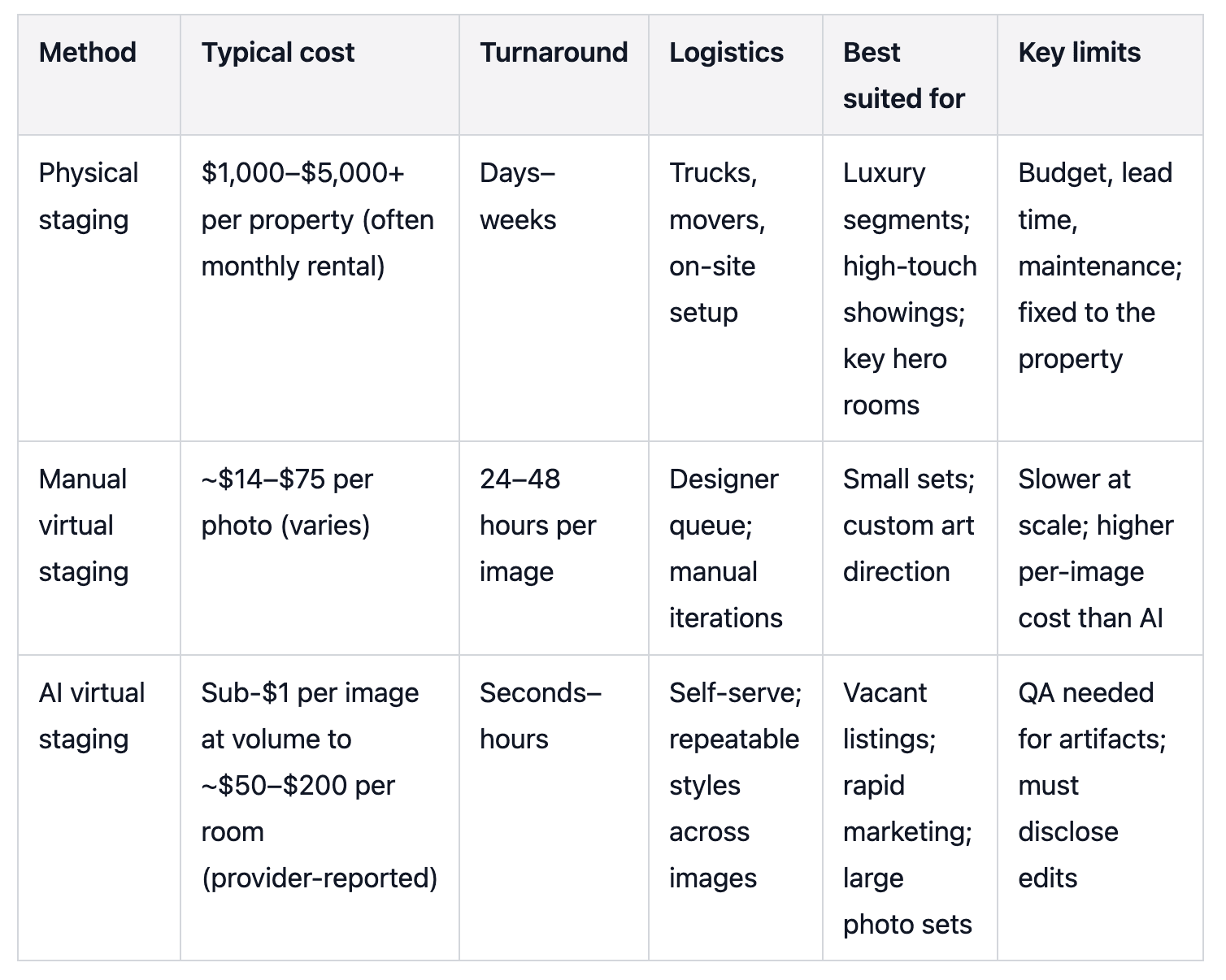
Cost ranges above are drawn from industry explainers and provider‑reported guides—verify current rates locally. See Revive Real Estate’s comparison (2024) and Aihomedesign’s pricing guides (2025) for representative ranges.
Why agents use AI virtual staging
Speed and scale: Generate staged visuals across multiple rooms in hours, not weeks. That matters when you’re racing to hit the MLS by Friday.
Cost efficiency: Per‑image costs are typically far lower than physical staging fees per property, useful for mid‑market budgets.
Visualization: Empty rooms look flat online; AI staging makes scale and layout intuitive so buyers can picture daily life.
Flexibility: Swap styles and re‑run angles without rescheduling movers.
But there are limits you should plan for:
Expectation management: Stage to suggest possibilities, not to misrepresent. Don’t add architectural features or impossible views.
Photorealism QA: Watch for scale, shadows, reflections, and perspective lines that feel “off.” Re‑run images when needed.
Compliance: MLSs increasingly require clear labels and, in some areas, an original image adjacent to the altered one.
Vacant listing workflow — step by step
Capture professionally
Shoot wide, level, well‑lit photos of core rooms (living room, primary bedroom, kitchen). Use high‑resolution JPEGs or PNGs suitable for web delivery. Clean or declutter first so the AI can place furniture accurately.
Upload and select style
Send photos to your AI staging tool. Choose styles aligned with your buyer segment (e.g., contemporary, transitional, farmhouse). If you have multiple angles of the same room, generate a consistent set.
Review and quality‑check
Evaluate scale vs. room dimensions; align perspective lines; confirm shadows and reflections fit the light direction; scan window views and color temperature. If anything looks jarring, regenerate or request tweaks.
Export and label for MLS
Export MLS‑ready files at approved sizes. Label images or add captions/remarks per local rules. In California, many MLSs require the original photo to appear adjacent to the altered version and to include descriptors like “virtually staged” or “digitally altered.” See CRMLS guidance on digitally altered images (2025–2026) and SDMLS AB 723 requirements (2025–2026).
Syndicate and preserve an audit trail
Upload to your MLS and ensure downstream portals (IDX/VOW, syndication) carry required labels. Save originals and staged versions with timestamps to simplify compliance. Bright MLS defines virtual staging and requires disclosure (2024 policy). CVR MLS instructs disclosure in the REMARKS field (updated 2025). Always confirm the latest handbook in your market.
Cost and speed — how AI compares to physical
Provider‑reported and industry explainers suggest:
AI/virtual staging: seconds to hours per image; costs range from subscription credits (sometimes sub‑$1 at volume) to ~$50–$200 per room.
Manual virtual staging: typically 24–48 hours per image at ~$14–$75 per photo.
Physical staging: days to weeks; commonly $1,000–$5,000+ per property, often with monthly rental and on‑site logistics.
These ranges appear in sources like Revive Real Estate’s comparison (2024), Aihomedesign’s pricing guides (2025), Virtuance’s AI impact overview (2024–2025), and InstantDeco’s side‑by‑side (2025). Treat them as directional; confirm current rates and SLAs with your vendors.
Practical example: a vacant living room (with disclosure)
Disclosure: Collov AI is our product.
For a vacant living room, upload a wide, well‑lit shot and choose a contemporary style. Generate a consistent set across multiple angles, review scale and shadows, then export MLS‑ready files with the required labels or remarks. You can browse staged living room examples on the Collov site to see what buyers will experience online: living room virtual staging examples.
QA checklist for photorealism
Scale and proportion: Sofas, rugs, and tables should match room dimensions; doors and windows provide reference.
Perspective and alignment: Vertical lines stay vertical; furniture feet sit flush with floors.
Shadows, reflections, and light temperature: Consistent with the scene’s light sources and window orientation.
Window views and backgrounds: Avoid impossible scenery or extreme retouching that misleads.
MLS compliance essentials
Clear labeling and disclosure protect buyers and agents.
Bright MLS defines virtual staging and requires disclosure (2024 policy).
Under California’s AB 723, CRMLS requires the original image adjacent to the altered version and clear descriptors (2025–2026); SDMLS explains how adjacency applies across MLS, IDX/VOW, and syndication (2025–2026).
CVR MLS directs agents to disclose virtually staged images in the REMARKS field (updated 2025).
Example phrasing you might adapt to your market’s rules:
Photo caption: “Virtually staged for visualization.”
Remarks: “Select listing photos are virtually staged; original images are available in the photo set.”
Check your local MLS handbook for exact wording, placement, and any watermark requirements.
Advanced uses and when to go hybrid
Multi‑angle consistency: Furnish several angles of the same room to present a credible, cohesive layout set.
Renovation previews/material overlays: Simulate new flooring, paint, or finishes to help buyers see potential.
Hybrid approach: Consider physical staging for hero rooms in luxury listings and AI staging for secondary spaces.
Simple A/B testing: Publish a clean set of originals adjacent to labeled staged images and track CTR on portals, inquiries, and showing volume to gauge impact on DOM.
FAQs for agents
Is virtual staging allowed on MLS?
Generally yes, with required disclosures. Bright MLS defines and allows virtual staging with disclosure; CRMLS and SDMLS (AB 723) require labeling and adjacency; CVR MLS requires disclosure in remarks. Always read your local rules.
What should my disclosure say?
Follow your MLS’s language. Many accept concise phrases like “virtually staged” in captions plus a note in remarks. In California, ensure the original photo is adjacent and labeled per AB 723 guidance.
How fast is AI virtual staging?
Often seconds to hours per image. Manual virtual staging commonly takes 24–48 hours; physical staging requires days to weeks.
How much does it cost?
AI/virtual staging is typically priced per image or room and is far lower than physical staging per property. Verify current pricing and SLAs with your vendors.
Next steps
If you want to test AI virtual staging on a sample photo, explore the overview and examples here: Collov AI virtual staging. And before you publish, re‑check your local MLS handbook for disclosure, file size/type rules, and any AB 723 adjacency requirements in your market.